

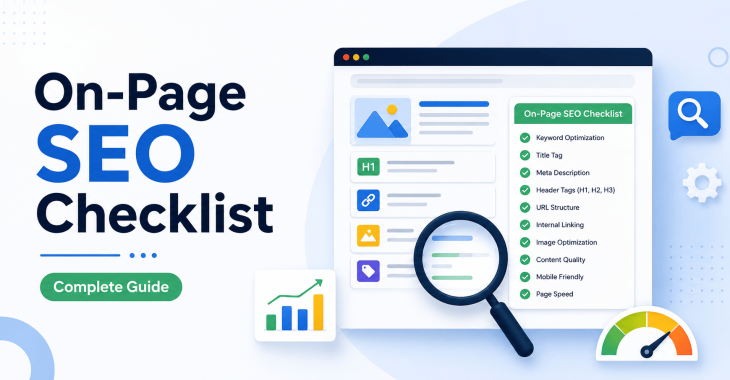
On-Page SEO Checklist: 25+ Steps to Optimize Your Website
- Kruti Varma /
- 2026-09-03 /
A solid on-page SEO checklist ensures search engines understand your content and rank it for relevant queries. This guide covers more than 25 concrete actions you can implement today, all centered on the primary keyword: On-Page SEO Checklist.
Introductory note: This guide treats On-Page SEO Checklist as a living framework. Each step can be adapted to your site’s goals, audience, and technical setup. The emphasis is on practical changes you can implement without depending on external tools alone.
1. Set the Foundation: Define Core Topics and Keywords
- Identify 4–6 core topics relevant to your business and audience.
- For each topic, list 3–5 target keywords and intent variations (informational, navigational, transactional).
- Map pages to topics so every major user intent has a dedicated page.
How to structure keyword targets
- Primary keyword: On-Page SEO Checklist (for the homepage or a pillar page)
- Secondary keywords: on-page optimization, on-page SEO factors, on-page SEO best practices
- Long-tail variations: how to perform on-page SEO, on-page SEO checklist for 2024, on-page SEO techniques for beginners
2. Optimize Page Titles: Clarity, Relevance, and Length
- Place the primary keyword near the beginning of the title.
- Keep titles under 60 characters to avoid truncation in search results.
- Ensure each page has a unique title that reflects its topic and intent.
Examples
- On-Page SEO Checklist: 25+ Steps to Optimize Your Website
- On-Page SEO Checklist for WordPress: Essential Factors
READ MORE: SEO Title Tag Best Practices: How to Write SEO-Friendly Titles
3. Craft Descriptive Meta Descriptions
- Write concise meta descriptions (about 155–165 characters) that summarize the page and include the primary keyword naturally.
- Include a call to action or value proposition when possible without stuffing keywords.
- Ensure each page’s meta description is unique.
READ MORE: SEO Meta Description Best Practices: How to Write Meta Descriptions That Get Clicks?
4. Use Semantic Headings to Structure Content
- H1 should be reserved for the page title and include the primary keyword.
- Use H2s for major sections and H3s for subsections where helpful.
- Maintain a logical hierarchy to guide both readers and search engines.
5. Optimize URLs for Readability and Relevance
- Include the primary keyword in the URL if it fits naturally.
- Keep URLs short, lowercase, and separated by hyphens.
- Remove stop words and unnecessary parameters when possible.
6. Improve Page Load Speed
- Compress images without sacrificing quality; aim for responsive images.
- Minimize CSS and JavaScript; consider async loading for non-critical scripts.
- Use browser caching and a lightweight framework to reduce render-blocking resources.
7. Implement Structured Data Where Appropriate
- Use schema types that match your content (e.g., Article, FAQ, How-To).
- Add JSON-LD markup to enhance search results with rich snippets.
- Validate structured data with a testing tool to avoid errors.
When to use structured data
- How-To guides, FAQ sections, and defined steps within your On-Page SEO Checklist.
8. Optimize Internal Linking
- Create a clear internal linking structure that guides users through related topics.
- Use descriptive anchor text that reflects the linked page’s topic.
- Ensure every page has at least a couple of internal links pointing to it from relevant pages.
9. Improve Image Accessibility and SEO
- Use descriptive file names with keywords where appropriate.
- Add alt text that describes the image and, where relevant, includes a keyword.
- Use lightbox or captioning for context on important visuals.
READ MORE: Image SEO Best Practices: How to Optimize Images for Google & Search Rankings?
10. Ensure Mobile-Friendliness
- Verify responsive design across devices and viewports.
- Check tap targets for size and spacing to ensure usability.
- Test page rendering on multiple mobile devices and screen sizes.
11. Structure Content for Readability
- Break content into short paragraphs (2–4 sentences).
- Use bullet points and numbered lists to summarize steps or categories.
- Include a brief introduction and a concise conclusion in each section.
12. Prioritize Content Relevance and Depth
- Provide thorough, actionable information for each topic.
- Use examples, mini-tutorials, or checklists to enhance usefulness.
- Avoid fluff; ensure every paragraph adds value to the On-Page SEO Checklist.
13. Align Content with User Intent
- Ensure each page’s content matches the user’s search intent (informational, how-to, or transactional).
- Add FAQs or related questions to address common user queries.
- Update content to reflect changing SEO practices and search results.
14. Optimize for Featured Snippets
- Answer common questions directly near the top of relevant sections.
- Use bullet points or numbered steps for procedural queries.
- Structure content with clear headings that reflect common user questions.
15. Manage External Links Responsibly
- Link to reputable sources when citing facts or best practices.
- Use nofollow or sponsored attributes only when appropriate.
- Ensure external links open in a new tab if it benefits the user experience.
READ MORE: SEO Audit for Small Business: Complete Step-by-Step Guide
16. Use Canonicalization Strategically
- Implement canonical tags to prevent duplicate content issues.
- Use canonical URLs for multiple pages with similar content or printable versions.
- Review sitewide canonical practices to avoid unintended consequences.
17. Optimize for Accessibility
- Ensure sufficient color contrast and readable typography.
- Provide keyboard navigation support and ARIA labels where necessary.
- Use descriptive link text (avoid “click here” for important pages).
18. Leverage Content Freshness and Updates
- Update the On-Page SEO Checklist page periodically with new steps or refinements.
- Note changes with a timestamp or a changelog section.
- Revisit evergreen content to keep it accurate and relevant.
19. Implement Clear, Actionable CTAs
- Include a primary call-to-action for each major section (e.g., “Review Your Page,” “Implement These Steps”).
- Place CTAs where users expect them and ensure they don’t interrupt the reading flow.
- Use contrasting colors and accessible button styles.
20. Establish a Content Audit Process
- Schedule regular content audits to review on-page elements (titles, meta descriptions, headings, internal links).
- Maintain a checklist to track changes and outcomes.
- Use audits to identify content gaps and opportunities for optimization.
READ MORE: SEO Checklist for New Website: 25+ Steps to Rank on Google
21. Optimize for Alt Text and Accessibility Signals
- Provide descriptive alt text for all images, including keywords where it makes sense.
- Avoid keyword stuffing in alt attributes; prioritize accurate descriptions.
- Use decorative images with empty alt text when they add no informational value.
22. Ensure Robust Page Experience Signals
- Avoid intrusive interstitials that hinder readability on mobile.
- Maintain a clean, navigable layout with consistent branding.
- Ensure content loading remains fast on both desktop and mobile.
23. Implement Version Control for Content Changes
- Track revisions to pages and ensure you can revert if needed.
- Use a content management workflow that records author and timestamp data.
- Maintain a changelog near the page to document major optimizations.
24. Localized On-Page SEO (If Applicable)
- Include local signals (city, region) in title tags and content when relevant.
- Use structured data for LocalBusiness where appropriate.
- Ensure NAP consistency across listings if your site targets local audiences.
READ MORE: How to Rank on Google Maps: Proven Local SEO Strategies
25. Prepare for Future-Proofing: Core Web Vitals Alignment
- Focus on measurable speed and stability factors relevant to Core Web Vitals.
- Optimize LCP (Largest Contentful Paint), FID (First Input Delay), and CLS (Cumulative Layout Shift) where possible.
- Test changes and monitor impact on user experience and rankings over time.
26. Content Formatting and Readability Enhancements
- Use concise, actionable sentences and avoid jargon without explanation.
- Break long sections with subheadings to maintain readability.
- Include short summaries at the end of major sections to reinforce takeaways.
27. Page-Level Schemas and Content Semantics
- For each significant page, apply appropriate schema types (Article, FAQPage, HowTo).
- Ensure the schema aligns with page content and user expectations.
- Validate the markup to prevent errors in search results.
28. Regular Review of Internal Link Equity
- Audit internal links to ensure high-importance pages receive sufficient link equity.
- Adjust anchor text to reflect target pages’ topics and intents.
- Remove or fix broken internal links to preserve crawlability.
READ MORE: SEO Mistakes to Avoid: 15 Common SEO Errors That Hurt Rankings
29. Internationalization and Hreflang (If Applicable)
- Use hreflang tags for pages serving multiple languages or regions.
- Ensure language and regional targeting align with content and audience.
- Maintain separate sitemaps for localized versions where appropriate.
30. Accessibility of Rich Media
- Provide transcripts or captions for video and audio content.
- Use structured data for media content when useful to users.
- Ensure media elements do not block critical page content.
Takeaways
Implementing a robust On-Page SEO Checklist involves aligning content, structure, and technical signals with user intent and search engine expectations. By following the steps above, you can improve visibility and user engagement while maintaining a clear, navigable site architecture.
READ MORE: Why is it Important to Hire SEO Company For Your Business?
Conclusion
A disciplined, iterative approach to On-Page SEO Checklist yields lasting results. Focus on clear structure, relevant keywords, fast performance, and accessible, high-quality content. Regularly reassess each element to stay aligned with evolving search algorithms and user behavior.
Recent Blogs
-
Why Is My Website Page Not Indexed by Google? 12 Reasons & How to Fix It
Posted ::2026-09-24
-
How to Request Indexing of a Website Page on Google?
Posted ::2026-09-19
-
Google Search Console Guide 2026: Complete Beginner’s Guide
Posted ::2026-09-18
-
Keyword Clustering SEO: How to Group Keywords for Better Rankings
Posted ::2026-09-12
-
SEO Audit Checklist: 50+ Steps to Audit Your Website
Posted ::2026-09-11


Our FAQ’s
What is digital marketing?
Digital marketing involves marketing to people using Internet-connected electronic devices, namely computers, smartphones and tablets. Digital marketing focuses on channels such as search engines, social media, email, websites and apps to connect with prospects and customers.
What does a digital marketer do?
Digital marketing has evolved to the point where an immense array of specialists consult with brands to develop effective strategies or implement programs. If you’re new to digital marketing, or lack experience or resources, you should consider engaging an experienced and versatile digital marketing consultant.
Would my business benefit from digital marketing?
Definitely. Though companies in many business categories continue to approach digital marketing with skepticism, avoiding digital marketing denies your business access to the media the majority of consumers turn to first and at all hours of the day.
What’s the biggest mistake digital marketers make?
Blowing their own horn. Yes, of course, the primary goal of marketing is to create leads. However, in the age of digital media a brand-centric, salesy approach deflects interest in your company. Make your marketing customer-centric. Second biggest mistake: Far too often, digital marketers start and stop. You need to contribute a steady flow of content to the channels you use.
How often should I update my website?
Websites that go for long periods with no updates and new content are unlikely to perform well or support any useful digital marketing objectives. Though a static website technically qualifies as a website it’s bound to be more than a digital brochure that produces little or no leads.
What do I need to know about mobile?
Mobile phones are the most used technology in the world. Most of your prospects spend the majority of their media time—and hours—using a smartphone. Mobile marketing focuses on mobile strategies like messaging, mobile applications, and mobile websites. A brand that ignores mobile marketing is doomed.
What is content marketing?
Content marketing is the creation and distribution of educational and/or entertaining information assets for the purpose of generating brand awareness, traffic, leads and sales. Marketing content is generally free and does not explicitly promote your brand as an ad would.
What’s involved in creating a content marketing strategy?
A content marketing strategy is a plan for building an audience. Elements of content marketing strategy include establishing objectives, audience personas, a value proposition, content marketing mission statement, a buyer journey map, and plans for creating, promoting and analyzing how content marketing assets and programs perform.
Do I need a blog?
Email, social media, search and other elements of your digital marketing mix will depend on delivering useful content. Though video outlets, podcasts, and media galleries present other options, a blog is by far the most used tactic for distributing marketing content on a channel over which you have complete control.
What content should we create?
There can be no all-encompassing answer to this question except to say you should create content buyers will find relevant and useful. Leading candidates include blog posts, articles, ebooks, infographics, microsites, videos, courses, case studies, newsletters, visuals and various forms of interactive content.
What is SEO?
Search engine optimization (SEO) is the process of using onsite and offsite tactics to help get content presented by a search engine. Done well, the practice increases the quantity and quality of your traffic.
Why is SEO important?
The majority of web traffic is generated by search and those that come by way of search have a greater degree of commercial intent than most other channels.
What is local SEO?
Local SEO is the process of optimizing your online properties to generate traffic from location-based searches. It helps businesses promote products and services to local customers when they need them.
What are keywords?
Keywords are the words and phrases searchers use—usually with search engines—to find relevant pages, images, videos, or any kind of information when looking for answers, knowledge, products, or services. SEO professionals consider keywords and the topics they suggest when optimizing content for search.
What determines search engine rankings?
This question is the source of endless speculation and debate because search engine companies such as Google will not answer it. Experts generally agree rankings are based on relevance and authority, but the factors that determine them are many—and inconsistent. The best way to achieve a high search engine ranking is to create one of the most thorough web pages possible for a specific keyword or topic.
What is PPC?
PPC stands for pay-per-click. Essentially, it’s a way of buying web traffic. Advertisers pay a fee each time one of their ads is clicked. Search engine advertising is the most popular form of PPC, however numerous channels including Facebook now offer PPC ad models.
Why is social media important?
Chances are your audience is active on one or more of the major social networks where billions of people spend time daily. Brands that understand the power of social media marketing and commit resources to it can boost awareness, drive traffic, interact with customers, drive sales, build loyalty, and win advocates.
What is a lead magnet?
A lead magnet is a free offer you make in exchange for an email address (and possibly additional information). The purpose is to inspire prospects to join your email list by offering something of value. Examples include an ebook, guide, report, assessment, cheat sheet, tool, template, webinar, course, or a coupon.
What is a call to action?
A call to action (CTA) is a prompt that instructs the viewer to take a specific action. A call to action is typically written as a command, such as “Buy Now.” In digital marketing a CTA generally takes the form of a button or link.
How long does it take to see results?
Paid digital marketing programs should create results immediately. On the other hand, programs such as content marketing, email list building, and search engine optimization require persistence and patience. You might see some results in a matter of months; however, it’s likely to be six months to a year before you realize some of your traffic and conversion objectives.