

SEO Checklist for New Website: 25+ Steps to Rank on Google
- Kruti Varma /
- 2026-09-03 /
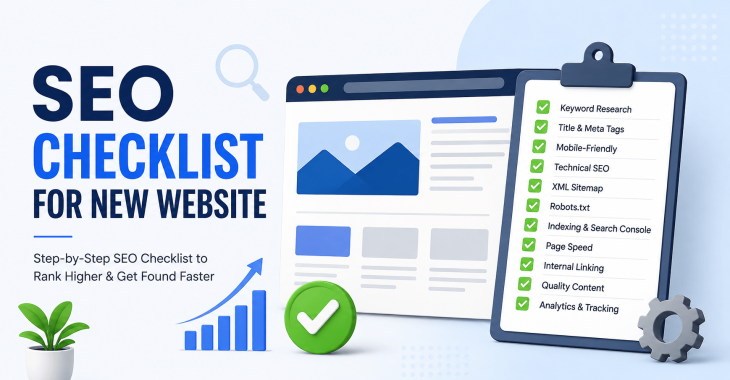
A solid SEO checklist for a new website helps you build a foundation that scales. This guide covers more than basics, focusing on practical, actionable steps you can implement now. The primary keyword is “SEO checklist for new website,” and you’ll see it woven through the headings and content naturally.
Why an SEO checklist for a new website matters?
Starting strong with an SEO checklist for a new website reduces rework later. It aligns technical setup, content quality, and user experience with Google’s ranking signals. A structured approach helps you track progress and demonstrate consistent improvement over time.
1) Define goals and target audience
- Clarify what success looks like: organic traffic, qualified leads, or product sign-ups.
- Identify your target audience segments and their search intent.
- Map audience needs to content goals, ensuring your SEO checklist for a new website stays focused.
READ MORE: 7 Best SEO Hacks that Increase Your Search Traffic in 60 Days
2) Keyword research foundations
Core vs. long-tail keywords
- Build a core set of high-intent keywords relevant to your niche.
- Expand with long-tail variations that address specific questions and problems.
Primary and secondary priorities
- Assign priority to keywords by search volume, difficulty, and alignment with offerings.
- Create clusters around each primary keyword to guide content planning.
3) Technical SEO setup
Crawlability and indexing
- Ensure your robots.txt allows search engines to crawl essential pages.
- Create and submit an XML sitemap and keep it updated as you publish.
Site structure and URLs
- Use a clear, logical hierarchy with keyword-friendly URLs.
- Avoid dynamic parameters where possible; if needed, implement proper canonicalization.
Core web vitals and performance
- Aim for fast LCP times by optimizing server response and image loading.
- Optimize FID and CLS by minimizing third-party scripts and layout shifts.
- Use modern formats (e.g., WebP for images) and proper compression.
4) Content strategy aligned with the SEO checklist for new website
Page-level optimization
- Write unique, value-driven titles and meta descriptions for every page.
- Use header structure (H1, H2, H3) to organize content and include target keywords naturally.
- Include internal links to related content to reinforce topical authority.
Content quality and usefulness
- Provide practical, actionable information that answers user questions.
- Use concise paragraphs (2–4 sentences) and scannable lists.
Content gaps and refreshes
- Audit existing pages for outdated information and update as needed.
- Identify topics not covered by competitors and create new content that fills the gaps.
5) On-page optimization essentials
Title tags and meta descriptions
- Craft compelling titles with primary keywords near the front when possible.
- Write meta descriptions that clearly describe the page and include a call to action where appropriate.
Headings and keyword placement
- Use keywords in at least one subheading and naturally throughout the body.
- Avoid keyword stuffing; prioritize readability and user intent.
Images and alt text
- Compress images to reduce page weight without sacrificing quality.
- Add descriptive alt text that includes relevant keywords where appropriate.
READ MORE: SEO Audit for Small Business: Complete Step-by-Step Guide
6) Internal linking and site navigation
- Create a logical internal linking structure that guides users and crawlers.
- Use descriptive anchor text that reflects the linked page’s topic.
- Ensure important pages receive enough internal links from other pages.
7) Technical hygiene for a clean crawl
canonicalization and duplicate content
- Use canonical tags to indicate the preferred version of similar pages.
- Avoid duplicative content across multiple URLs.
structured data and rich results
- Implement relevant schema markup (organization, breadcrumbs, articles) to aid understanding.
- Validate structured data with a validator to prevent errors.
8) Mobile-friendliness and UX
- Confirm responsive design across common devices and viewports.
- Prioritize accessibility, including readable contrast and navigable controls.
- Ensure interactive elements are easy to use on small screens.
9) Security and trust signals
- Install an SSL certificate and serve pages over HTTPS.
- Use a clean domain history, avoid sudden shifts in domain behavior that erode trust.
- Provide transparent contact information and clear policies.
READ MORE: SEO Title Tag Best Practices: How to Write SEO-Friendly Titles
10) Local SEO considerations (if applicable)
- Create a Google Business Profile and keep it up to date.
- Ensure NAP consistency across listings and on your site.
- Add location-based content and service-area pages if relevant.
READ MORE: How to Rank on Google Maps: Proven Local SEO Strategies
11) Technical deployment plan for a new site
- Create a staging environment for testing changes before going live.
- Establish a release schedule that aligns with content publishing and indexing.
- Monitor server logs to catch crawl errors quickly.
12) Content calendar and publishing cadence
- Plan a publishing rhythm that supports keyword targets and user needs.
- Align content topics with buyer journey stages.
- Schedule regular reviews to refresh evergreen posts.
13) Analytics setup and goals
- Install a robust analytics stack (e.g., a primary analytics platform plus a tag manager).
- Define goals and conversions tied to traffic quality and engagement.
- Set up dashboards to monitor organic performance and technical health.
14) Search console and monitoring
- Verify site ownership and submit a sitemap to Google Search Console.
- Monitor indexing coverage and fix errors promptly.
- Review performance reports to identify top queries and pages.
15) URL hygiene and redirects
- Avoid unnecessary URL changes; if changes occur, implement 301 redirects.
- Maintain a clean set of canonical URLs to prevent dilution of link equity.
16) Link-building foundations (ethically)
- Focus on earning high-quality, relevant backlinks through useful content.
- Build relationships with industry sites and contribute meaningfully.
- Avoid spammy tactics that can lead to penalties.
READ MORE: Image SEO Best Practices: How to Optimize Images for Google & Search Rankings?
17) Content formats and engagement
- Use a mix of formats: how-tos, guides, FAQs, and case studies.
- Include visuals, code blocks (where relevant), and practical examples.
- Encourage user engagement through comments, questions, or downloadable resources.
18) Technical SEO audit cadence
- Schedule periodic audits to catch crawl issues, broken links, and redirects.
- Track changes over time to understand impact on rankings and traffic.
- Prioritize issues by impact and ease of fix.
19) International and language considerations (if applicable)
- Use hreflang to indicate language and regional targeting.
- Ensure translated versions are accessible and properly indexed.
20) Content governance and updates
- Assign ownership for pages to keep content accurate.
- Create a revision history to track updates and improvements.
- Keep evergreen content fresh with new data, examples, or insights.
21) Conversion optimization alongside SEO
- Align content with user intent to improve engagement and conversions.
- Include clear calls to action and testimonial or trust elements where appropriate.
- Test layout changes that can impact user behavior and signals.
READ MORE: SEO Meta Description Best Practices: How to Write Meta Descriptions That Get Clicks?
22) Page experience signals
- Minimize intrusive interstitials that hinder user experience.
- Ensure fast render times and stable layout during page load.
- Provide accessible navigation and clear focus indicators.
23) Content duplication checks
- Regularly scan for duplicate meta descriptions and title tags.
- Consolidate similar pages or use canonicalization to avoid fragmentation.
- Be mindful of boilerplate content that might appear across multiple pages.
24) Stakeholder alignment and documentation
- Document SEO decisions and rationale to guide future updates.
- Share performance reports with stakeholders to maintain alignment.
- Use a centralized checklist to keep everyone on the same page.
25) 25+ practical steps in a phased rollout
- Phase 1: Technical foundation (crawlability, indexing, performance).
- Phase 2: Content and on-page optimization (titles, headings, internal links).
- Phase 3: Authority and trust (backlinks, EAT signals, local presence if needed).
- Phase 4: Monitoring and iteration (audits, analytics, adjustments).
READ MORE: How to Do SEO for a Website: A Step-by-Step Guide
26) Quick-start checklist for a new site launch
- Submit XML sitemap to search engines and verify in Search Console.
- Ensure all core pages have unique titles and meta descriptions.
- Verify mobile usability and Core Web Vitals targets.
- Set up analytics and conversion tracking from day one.
- Establish a content calendar for the first 90 days.
READ MORE: Why is it Important to Hire SEO Company For Your Business?
Takeaways
A focused SEO checklist for a new website keeps every action intentional and trackable. When you align technical setup, content quality, and user experience, you create a solid foundation for steady growth in organic rankings. Maintain discipline, monitor results, and iterate based on data.
Recent Blogs
-
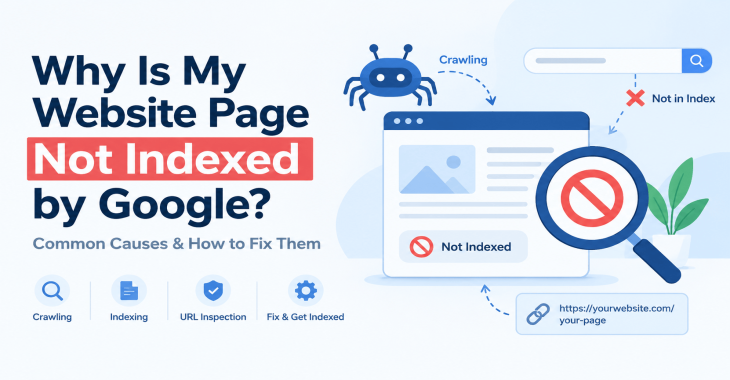
Why Is My Website Page Not Indexed by Google? 12 Reasons & How to Fix It
Posted ::2026-09-24
-
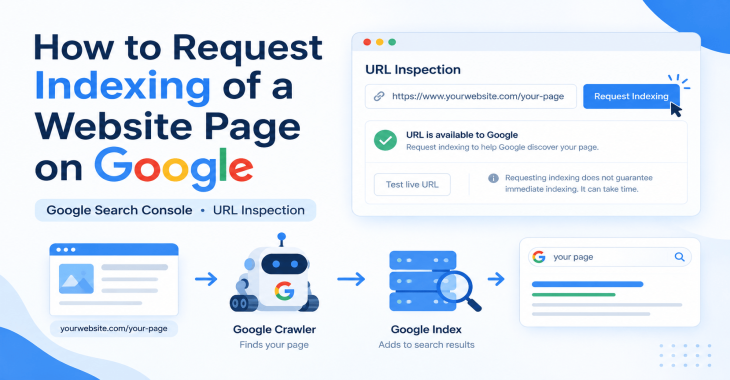
How to Request Indexing of a Website Page on Google?
Posted ::2026-09-19
-
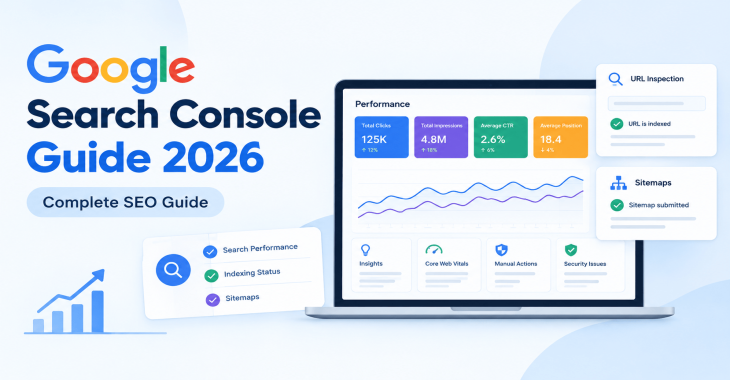
Google Search Console Guide 2026: Complete Beginner’s Guide
Posted ::2026-09-18
-
Keyword Clustering SEO: How to Group Keywords for Better Rankings
Posted ::2026-09-12
-
SEO Audit Checklist: 50+ Steps to Audit Your Website
Posted ::2026-09-11


Our FAQ’s
What is digital marketing?
Digital marketing involves marketing to people using Internet-connected electronic devices, namely computers, smartphones and tablets. Digital marketing focuses on channels such as search engines, social media, email, websites and apps to connect with prospects and customers.
What does a digital marketer do?
Digital marketing has evolved to the point where an immense array of specialists consult with brands to develop effective strategies or implement programs. If you’re new to digital marketing, or lack experience or resources, you should consider engaging an experienced and versatile digital marketing consultant.
Would my business benefit from digital marketing?
Definitely. Though companies in many business categories continue to approach digital marketing with skepticism, avoiding digital marketing denies your business access to the media the majority of consumers turn to first and at all hours of the day.
What’s the biggest mistake digital marketers make?
Blowing their own horn. Yes, of course, the primary goal of marketing is to create leads. However, in the age of digital media a brand-centric, salesy approach deflects interest in your company. Make your marketing customer-centric. Second biggest mistake: Far too often, digital marketers start and stop. You need to contribute a steady flow of content to the channels you use.
How often should I update my website?
Websites that go for long periods with no updates and new content are unlikely to perform well or support any useful digital marketing objectives. Though a static website technically qualifies as a website it’s bound to be more than a digital brochure that produces little or no leads.
What do I need to know about mobile?
Mobile phones are the most used technology in the world. Most of your prospects spend the majority of their media time—and hours—using a smartphone. Mobile marketing focuses on mobile strategies like messaging, mobile applications, and mobile websites. A brand that ignores mobile marketing is doomed.
What is content marketing?
Content marketing is the creation and distribution of educational and/or entertaining information assets for the purpose of generating brand awareness, traffic, leads and sales. Marketing content is generally free and does not explicitly promote your brand as an ad would.
What’s involved in creating a content marketing strategy?
A content marketing strategy is a plan for building an audience. Elements of content marketing strategy include establishing objectives, audience personas, a value proposition, content marketing mission statement, a buyer journey map, and plans for creating, promoting and analyzing how content marketing assets and programs perform.
Do I need a blog?
Email, social media, search and other elements of your digital marketing mix will depend on delivering useful content. Though video outlets, podcasts, and media galleries present other options, a blog is by far the most used tactic for distributing marketing content on a channel over which you have complete control.
What content should we create?
There can be no all-encompassing answer to this question except to say you should create content buyers will find relevant and useful. Leading candidates include blog posts, articles, ebooks, infographics, microsites, videos, courses, case studies, newsletters, visuals and various forms of interactive content.
What is SEO?
Search engine optimization (SEO) is the process of using onsite and offsite tactics to help get content presented by a search engine. Done well, the practice increases the quantity and quality of your traffic.
Why is SEO important?
The majority of web traffic is generated by search and those that come by way of search have a greater degree of commercial intent than most other channels.
What is local SEO?
Local SEO is the process of optimizing your online properties to generate traffic from location-based searches. It helps businesses promote products and services to local customers when they need them.
What are keywords?
Keywords are the words and phrases searchers use—usually with search engines—to find relevant pages, images, videos, or any kind of information when looking for answers, knowledge, products, or services. SEO professionals consider keywords and the topics they suggest when optimizing content for search.
What determines search engine rankings?
This question is the source of endless speculation and debate because search engine companies such as Google will not answer it. Experts generally agree rankings are based on relevance and authority, but the factors that determine them are many—and inconsistent. The best way to achieve a high search engine ranking is to create one of the most thorough web pages possible for a specific keyword or topic.
What is PPC?
PPC stands for pay-per-click. Essentially, it’s a way of buying web traffic. Advertisers pay a fee each time one of their ads is clicked. Search engine advertising is the most popular form of PPC, however numerous channels including Facebook now offer PPC ad models.
Why is social media important?
Chances are your audience is active on one or more of the major social networks where billions of people spend time daily. Brands that understand the power of social media marketing and commit resources to it can boost awareness, drive traffic, interact with customers, drive sales, build loyalty, and win advocates.
What is a lead magnet?
A lead magnet is a free offer you make in exchange for an email address (and possibly additional information). The purpose is to inspire prospects to join your email list by offering something of value. Examples include an ebook, guide, report, assessment, cheat sheet, tool, template, webinar, course, or a coupon.
What is a call to action?
A call to action (CTA) is a prompt that instructs the viewer to take a specific action. A call to action is typically written as a command, such as “Buy Now.” In digital marketing a CTA generally takes the form of a button or link.
How long does it take to see results?
Paid digital marketing programs should create results immediately. On the other hand, programs such as content marketing, email list building, and search engine optimization require persistence and patience. You might see some results in a matter of months; however, it’s likely to be six months to a year before you realize some of your traffic and conversion objectives.